Customize
This page explains how to customize Beer System Prefabs. Change settings from the Unity Inspector.
Inspector labels below match the Japanese names in the Unity Editor.
Bottle settings
Select a bottle. The Inspector shows these fields.
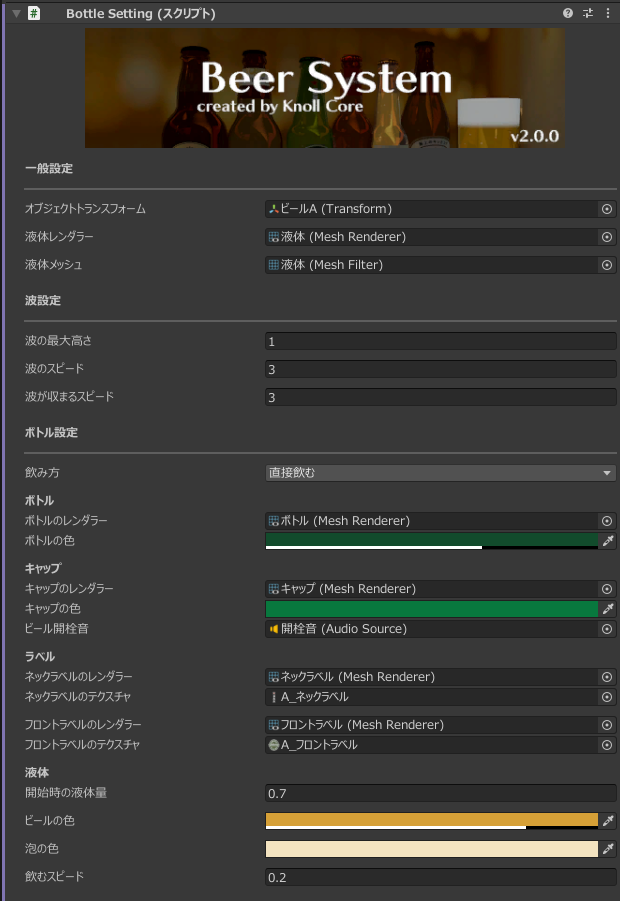
一般設定 (General)
Change the references if you use a custom model. You usually do not need to change them.
-
オブジェクトトランスフォーム
Transform of the liquid container. Change this when using a custom model.
-
液体レンダラー
Renderer that displays the liquid. Change this when using a custom model.
-
液体メッシュ
Mesh for the liquid. Change this when using a custom model.
波設定 (Waves)
-
波の最大高さ
Maximum amplitude when the liquid wobbles.
-
波のスピード
How fast the wobble moves.
-
波が収まるスピード
How fast the wobble settles.
ボトル設定 (Bottle)
-
飲み方
Set グラスに注ぐ (pour into a glass) or 直接飲む (drink from the bottle).
ボトル (Bottle look)
-
ボトルのレンダラー
Renderer for the bottle.
-
ボトルの色
Bottle color.
キャップ (Cap)
-
キャップのレンダラー
Renderer for the cap.
-
キャップの色
Cap color.
-
ビール開栓音
AudioSource played when the bottle is opened.
ラベル (Labels)
-
ネックラベルのレンダラー
Renderer for the neck label.
-
ネックラベルのテクスチャ
Texture for the neck label.
-
フロントラベルのレンダラー
Renderer for the front label.
-
フロントラベルのテクスチャ
Texture for the front label. Use this to change the bottle label.
液体 (Liquid)
-
開始時の液体量
Initial amount of liquid in the bottle.
-
ビールの色
Color of the beer in the bottle and of the beer pour particles.
-
泡の色
Color of the foam in the bottle and of the foam pour particles.
-
飲むスピード (when drink style is 直接飲む)
How fast the liquid decreases when drinking from the bottle.
-
液体パーティクル (when drink style is グラスに注ぐ)
Particle system used when pouring.
Glass settings
Select a glass. The Inspector shows these fields.
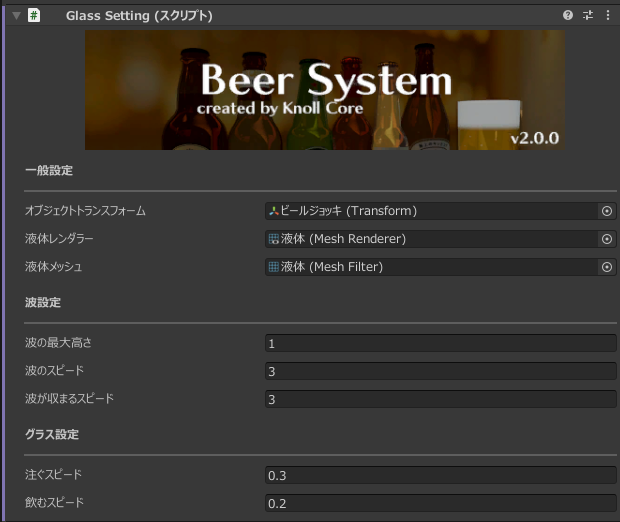
一般設定 (General)
Change the references if you use a custom model. You usually do not need to change them.
-
オブジェクトトランスフォーム
Transform of the liquid container. Change this when using a custom model.
-
液体レンダラー
Renderer that displays the liquid. Change this when using a custom model.
-
液体メッシュ
Mesh for the liquid. Change this when using a custom model.
波設定 (Waves)
-
波の最大高さ
Maximum amplitude when the liquid wobbles.
-
波のスピード
How fast the wobble moves.
-
波が収まるスピード
How fast the wobble settles.
グラス設定 (Glass)
-
注ぐスピード
How fast the liquid fills.
-
飲むスピード
How fast the liquid decreases when drinking.
If something looks off after you change settings, place the Prefab again or reset the values.